Running FreeToken Myself: 1.75x Over a Tuned llama.cpp
Previous post: FreeToken: Making Large MoE Models Practical on a Single Machine
Paper: FreeToken: Efficient Edge-Native MoE Serving with Bandwidth-Adaptive Execution
arXiv: 2608.16157
In the last post I walked through the FreeToken paper, which argues that running a big MoE model locally should be treated as a scheduling problem rather than a “make it fit in VRAM” problem. That is a reasonable claim on paper, but I wanted to know whether it survives contact with a real machine — specifically, whether it beats the tools I already have installed.
So I ran it. This post is what happened, including the part where my first answer turned out to be wrong.
The Short Version
On a single RTX 5070 Ti with 16 GB of VRAM, serving gpt-oss-120b — a 117-billion-parameter model whose weights take up 61 GB on disk:
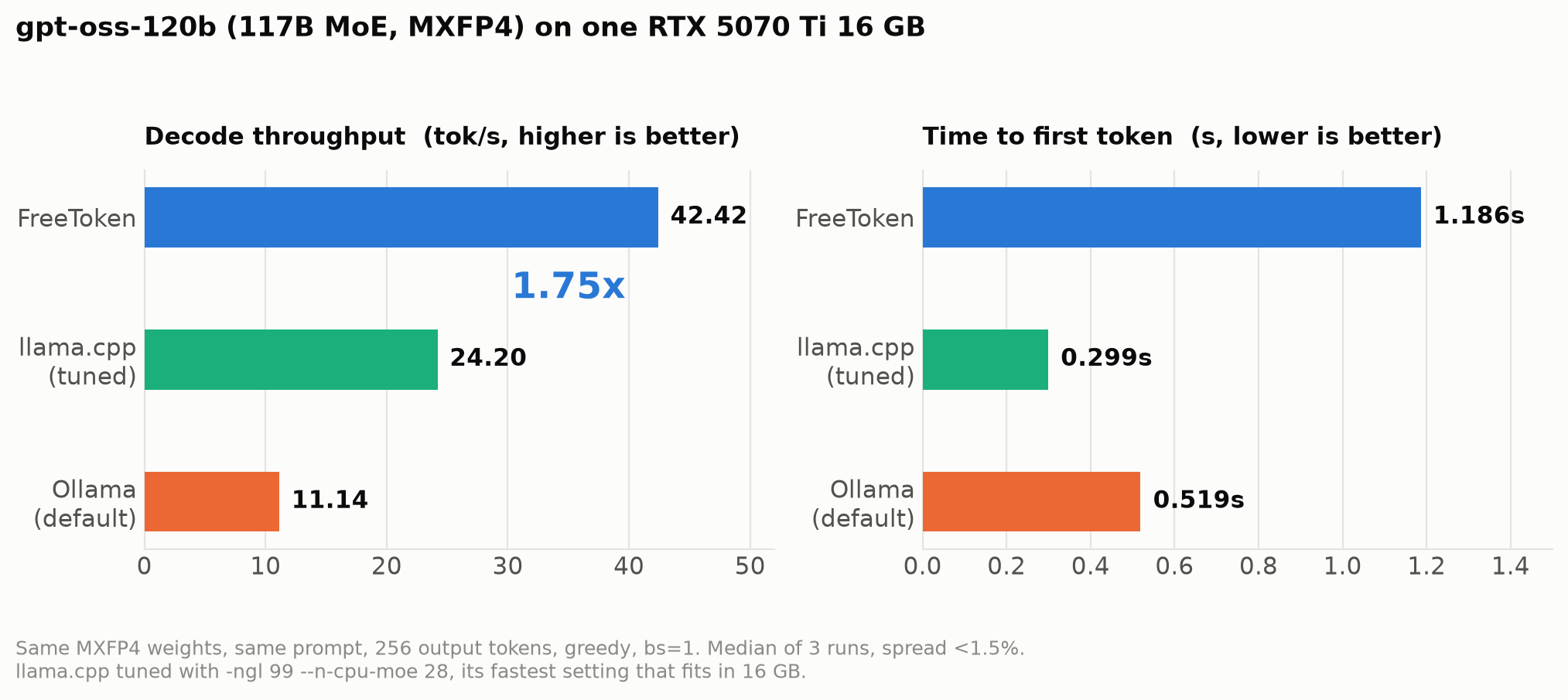
FreeToken            42.42 tokens/s
llama.cpp (tuned)    24.20 tokens/s     1.75x slower
Ollama (default)     11.14 tokens/s     3.81x slower
All three are running the same MXFP4 weights with the same prompt, the same 256 output tokens, and greedy sampling. The gap between them is entirely a difference in how the engine decides what lives where.
The important number is 1.75x, not 3.81x. I’ll explain why the Ollama comparison is misleading, because getting that wrong was the most instructive part of the whole exercise.
1. The Setup
The machine is a fairly ordinary gaming desktop: an RTX 5070 Ti with 16 GB of VRAM, a Ryzen 9 9900X with 12 cores, 128 GB of DDR5, and a PCIe 5.0 x16 slot. FreeToken’s CLI is Linux-only, so everything ran inside WSL2 on Windows 11 — which, as it turns out, costs FreeToken a few percent. More on that at the end.
The 128 GB of system RAM is the part that matters. The whole idea behind expert offloading is that host memory becomes the model’s real home and the GPU just borrows pieces of it, so a machine with lots of RAM is where this approach gets interesting.
Choosing the model took more thought than I expected. FreeToken’s README advertises 290B+ models, but when I checked the actual checkpoint sizes, most of them simply don’t fit in 128 GB — GLM-5.2 needs around 400 GB and DeepSeek-V4-Flash needs 167 GB. That left gpt-oss-120b at 65 GB, which turned out to be the right pick for a much better reason than size:
Ollama’s
gpt-oss:120band the Hugging Face checkpoint are the same MXFP4 weights.
Most local-inference comparisons are quietly unfair, because one engine is running a 4-bit GGUF while the other runs some different quantization, and part of the “speed difference” is really a precision difference. Here I could verify that all three engines load identical numbers, so what I’m measuring is the engine and nothing else.
2. FreeToken Measures Your Machine Before It Decides Anything
Before serving a single token, FreeToken has a calibration command that measures the two routes an expert can take to get used: either you copy it across PCIe to the GPU, or you leave it in RAM and compute on the CPU.
ft bench bw --dtype mxfp4,bf16
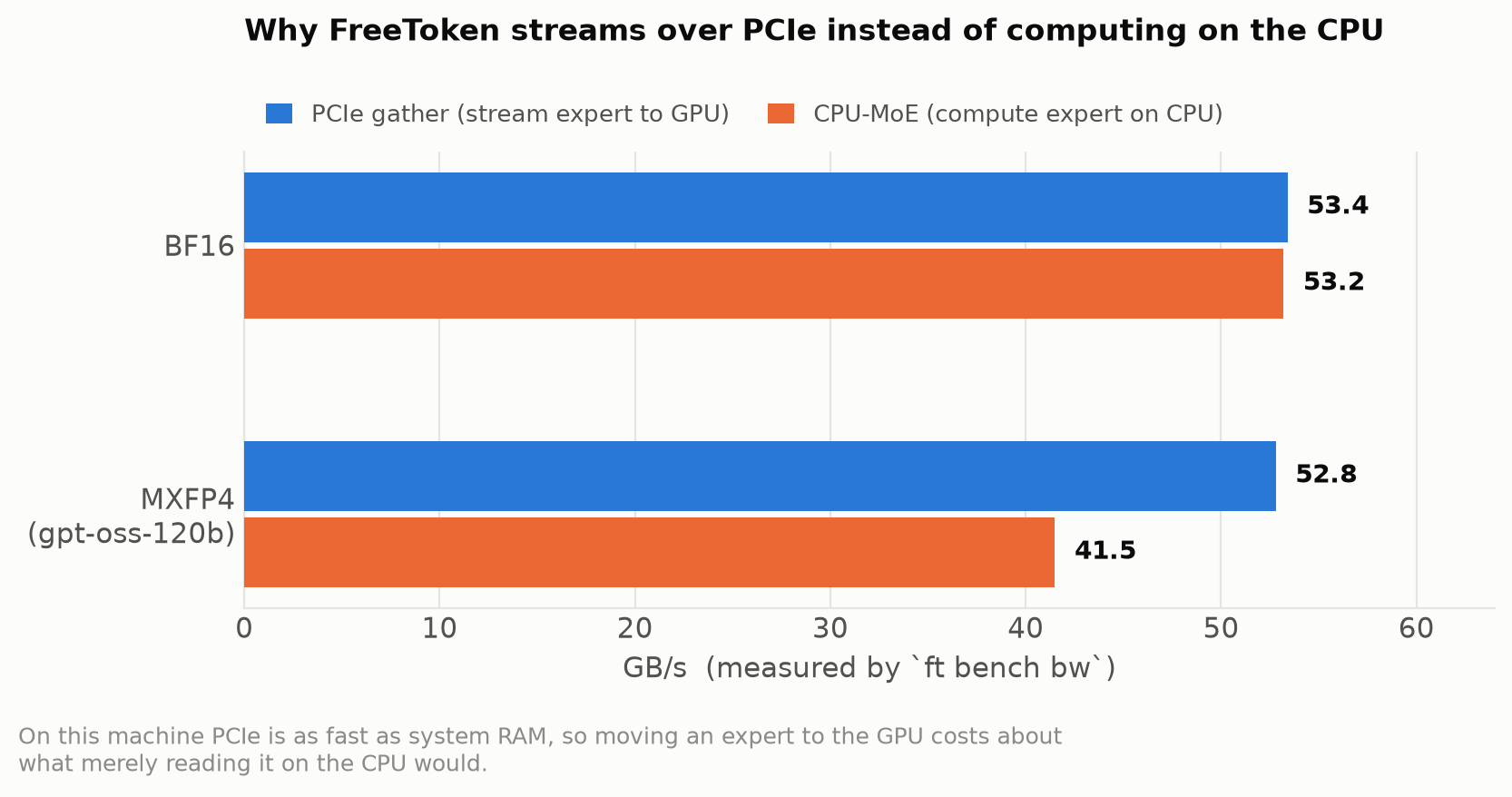
The result surprised me. On this machine PCIe runs at 56.6 GB/s while the CPU’s entire memory read bandwidth is 54.2 GB/s, which means shipping an expert to the GPU costs about what merely reading it on the CPU would — before the CPU has done any actual arithmetic. PCIe 5.0 is simply that fast relative to dual-channel DDR5.
FreeToken only splits work between CPU and PCIe when the CPU is at least twice as fast, and it never gets close here, so it chose pure PCIe streaming:
Auto-selected MoE backend: offload
This is worth being honest about, because it means the paper’s headline mechanism — the bandwidth-adaptive split — does nothing on my hardware. That is not a failure, though. The policy’s job is to look at the machine and decide, and on a PCIe-rich desktop the correct decision is to leave the CPU alone. Where it would earn its keep is the opposite kind of machine: a laptop with a narrow PCIe link, or a workstation with eight memory channels feeding a slower bus. I couldn’t test those, so all I can report is that the policy declined to engage and was right to.
3. The First Answer, and Why It Was Wrong
My first comparison was FreeToken against Ollama, since Ollama is what most people actually have installed. FreeToken came in at 42.42 tok/s against Ollama’s 11.14, which is a 3.81x gap — a much bigger number than I expected, and big enough that I went looking for a mistake in my own measurement rather than believing it.
The measurement was fine. The problem was the baseline. Running ollama ps while the model was loaded showed what was actually happening:
gpt-oss:120b   66 GB   78%/22% CPU/GPU   4096 ctx
"offloaded 8/37 layers to GPU"
Ollama had put 8 complete layers on the GPU and was running the other 29 entirely on the CPU. And when I went looking for a way to improve that, I found that Ollama doesn’t really expose one. Its environment variables cover context length, KV cache type, and flash attention, but nothing that changes how the model is split. The only offload knob is num_gpu, which just changes how many whole layers go to the GPU — and since Ollama had already filled VRAM to 14.5 of 16.3 GB, there was at most one more layer available anyway.
So “3.81x faster than Ollama” is a real measurement of a real default configuration, but it is not a fair statement about the state of the art. Ollama is a wrapper around llama.cpp, and llama.cpp has a much better option that Ollama simply doesn’t surface.
4. The Real Comparison
That option is --n-cpu-moe, and understanding why it matters is the core of this whole post.
A transformer layer contains two very different things: an attention block, which is small but does a lot of math, and in an MoE model a set of experts, which are enormous but only a few get used per token. gpt-oss-120b has 128 experts per layer and uses 4 of them for any given token. When Ollama moves a layer to the CPU, it moves both parts — so the small, compute-heavy attention block ends up on the slow device along with the experts, for no good reason.
--n-cpu-moe N splits them apart. It keeps every layer’s attention on the GPU and pushes only the expert weights of the first N layers to the CPU. You get the compute-heavy part on the fast device and the bulky part wherever there’s room.
So I built llama.cpp from source and swept N to find its best setting on this GPU. (The build was more annoying than it should have been — CUDA 13.1’s runtime segfaults inside WSL’s driver stub, so I had to build against CUDA 12.8, and Ollama’s GGUF turned out to use a non-standard architecture string that upstream llama.cpp refuses to load, so I had to download llama.cpp’s own MXFP4 build of the same model.)
The result is that llama.cpp reaches 24.20 tok/s — more than twice Ollama’s 11.14, on the same engine, with the same weights, on the same hardware. The entire difference is one command-line flag that Ollama doesn’t let you set.
5. Why llama.cpp Still Hits a Ceiling
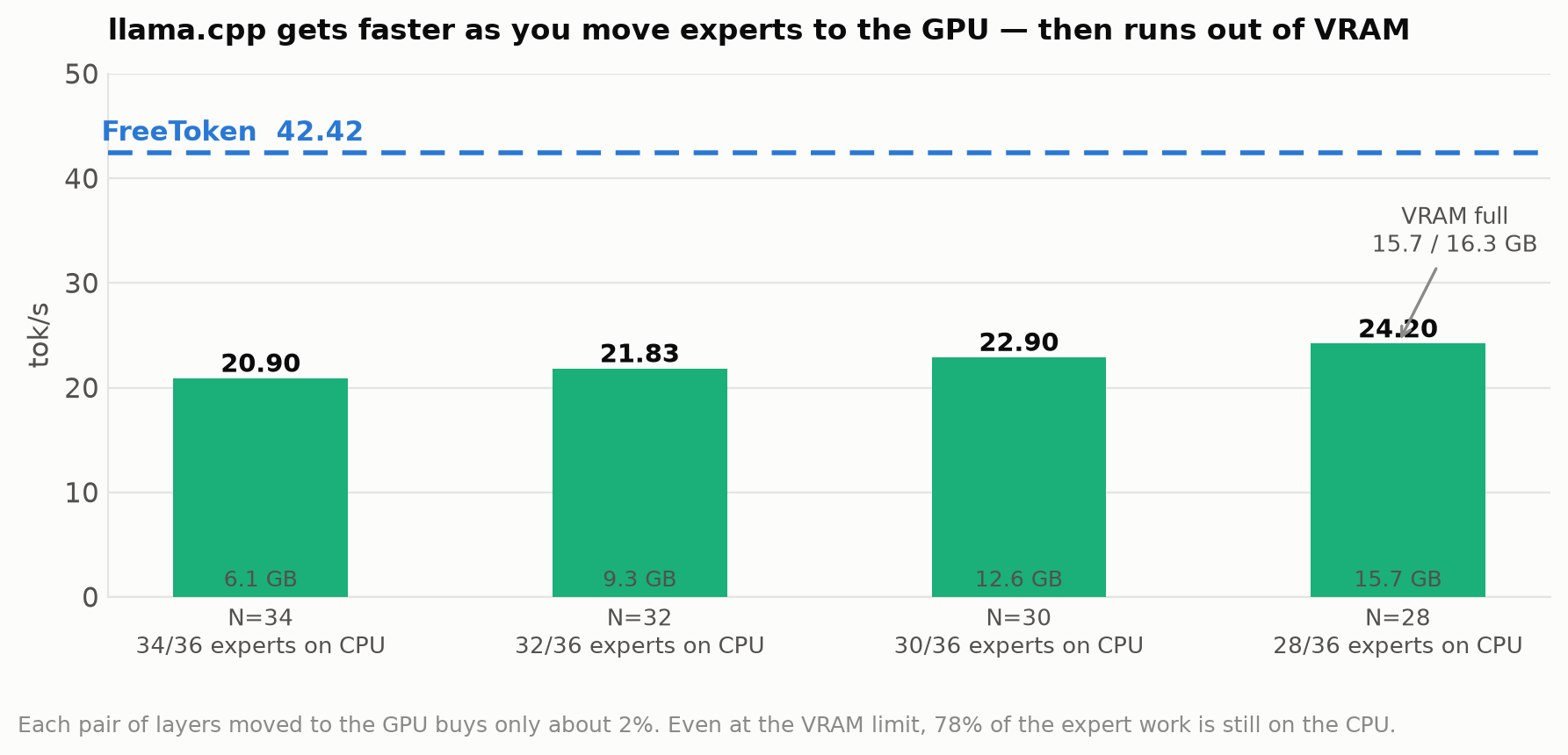
The sweep also shows something more interesting than the peak number, which is the shape of the curve. Each time I moved two more layers’ worth of experts onto the GPU, throughput went up by only about 2%, and the climb ran out of road at N=28 with 15.7 of 16.3 GB of VRAM used. There is nowhere further to go.
The reason is that even at that limit, 78% of the expert work is still happening on the CPU. Moving layers two at a time nibbles at the edge of the problem rather than changing it, because the CPU is doing the bulk of the work either way and it runs at roughly 16 GB/s effective — less than a third of what PCIe delivers on this machine.
FreeToken reaches 42.42 tok/s using less VRAM (13.9 GB), and it gets there by never making the layer-level decision at all. Every layer computes on the GPU, and individual experts are fetched across PCIe as the router asks for them. It’s the difference between moving whole shelves out of a room when you only needed one book from each, and just fetching the books.
There’s a nice measurement that shows this working. FreeToken keeps a cache of the most recently used experts in VRAM — 702 of the model’s 4,608 experts, or about 15% of them. If the router picked experts at random, that cache would hit 15% of the time. In practice it hits 31.5%:
15.2% of experts resident -> 31.5% of lookups served
Routers, it turns out, are not random — some experts are simply much more popular than others, and a cache that operates at expert granularity can exploit that. A cache that operates at layer granularity cannot, because it has already committed to entire layers before the router says anything.
6. What I’d Argue With
A few things about this result deserve scepticism, so here’s what I’d attack if someone showed it to me.
The 3.81x number should be retired. It’s a true measurement of Ollama’s defaults, but Ollama’s defaults leave more than half of llama.cpp’s performance on the table. Anyone quoting it as “FreeToken vs llama.cpp” would be wrong. The defensible claim is 1.75x against a properly tuned llama.cpp, and that’s the number I’d stand behind.
FreeToken was running with a handicap. WSL caps how much host memory a process can pin to 40% of RAM, and the expert weights need 56.8 GB against a roughly 40 GB cap. That forces about 10 of the 36 layers onto the CPU path — the slower path on this machine, chosen by constraint rather than by policy — and costs around 7%. This isn’t fixable through configuration, because even WSL’s theoretical ceiling is below what the model needs. On native Linux the gap should be a little wider, not narrower.
llama.cpp wins on time-to-first-token, 0.30 s against FreeToken’s 1.19 s, and Ollama sits between them. If your workload is lots of short exchanges rather than long generations, that difference matters more than throughput does. FreeToken’s advantage is sustained decoding speed.
Ollama also had a small advantage I didn’t correct for. It ran with a 4096-token context while FreeToken reserved 8276, which means Ollama had slightly more VRAM available for weights. It still lost by 3.81x.
7. What I Take Away
The paper’s framing held up, but the part that produced the win wasn’t the part the paper spends the most space on. The bandwidth-adaptive split was inert on my hardware — it measured the machine, concluded the CPU wasn’t worth using, and stayed out of the way. What actually created the gap was the more mundane-sounding decision to offload at expert granularity instead of layer granularity, combined with a cache that takes advantage of the fact that routers have favourites.
I think that’s the more portable lesson. A layer is a convenient unit if you’re writing the code, because it’s how the model is structured. It’s a bad unit if you’re scheduling, because it forces two unrelated decisions — where attention runs and where experts run — to be made together, and one of them is almost always wrong.
The other thing I’d take away is more about method than about MoE. My first result was 3.81x, and it was correctly measured, reproducible, and misleading. It only became honest once I went and built the thing I’d waved away in a caveat. If you find yourself writing “of course, X wasn’t tuned” in your own benchmark, that sentence is usually pointing at the experiment you actually needed to run.